
The thesis
An agent is a model with a loop and a toolbox. The model decides what to do. The loop runs until the work is done or the budget is spent. The toolbox is the set of operations the model can invoke against the outside world. Most agent demos hide all three behind a chat interface and call the result autonomy. What gets called autonomy is usually opacity. The user sees a final answer, the operator sees a token bill, and nobody sees the seven tool calls and three retries that produced both.
The shape that ships does the opposite and makes every plan, every tool call and every observation that comes back from a tool visible. The user can pause the agent mid-loop, change the plan, and resume. The operator can branch a session, replay any step, and inspect the input and output of any tool call long after the session ended. That visibility is the minimum bar for an agent that's allowed near production data. The production agent-systems work applied the same sequence by designing the workflow, monitoring, and failure modes before treating the system as shipped. Without that bar, you have a black box that occasionally produces something useful and occasionally lights money on fire, and the operator has no way to tell the difference until a customer notices.
The loop shape that works
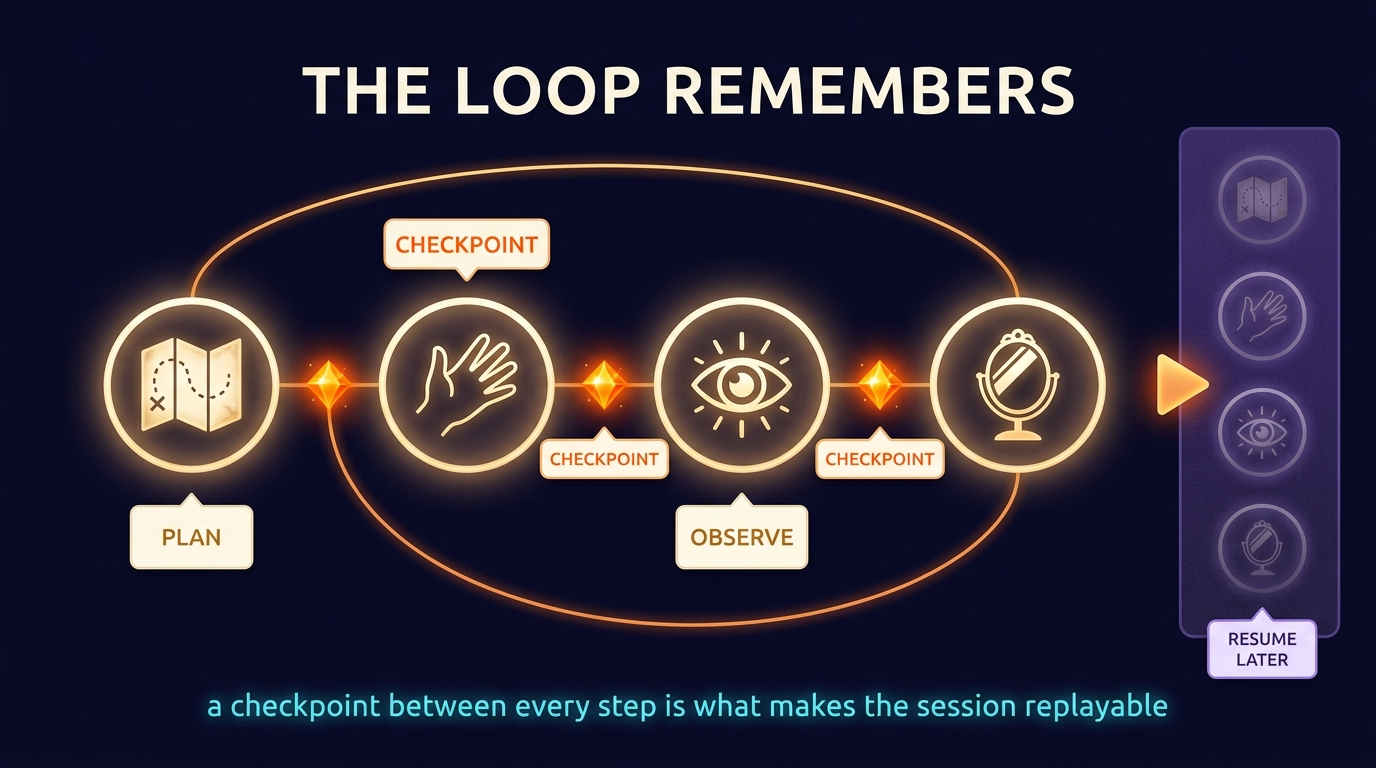
The canonical agent loop is plan, act, observe, reflect. The model proposes a plan: a small ordered list of intended steps. It selects the first step and emits a tool call: a typed function invocation with structured arguments. The runtime executes the tool and returns the structured result. The model observes the result. It either continues to the next planned step, replans because the observation invalidated the plan, or exits because the work is complete. Each transition is a checkpoint, and every checkpoint is persisted so the loop can resume from it.
This loop shape gives you determinism under failure. When a tool call fails (the API was down, the database returned an error, the token budget was exceeded), the loop pauses at the last successful checkpoint. The operator decides what to do: retry the failed call, branch and try a different tool, terminate the session, or hand the session to a human. Without checkpoints, the only choice on failure is "start over," which means losing the work the agent already did and paying for it again on the retry. With checkpoints, the agent picks up where it left off, the same way a long-running batch job does. The infrastructure is identical, and the discipline is recognizing that an agent is a long-running job, not a request-response.
Tools are contracts, not function calls
The model doesn't "call functions." The model emits structured arguments that the runtime validates against a typed schema and dispatches to a function. The schema is a contract, and the contract is what makes the system safe. If the model proposes calling delete-customer with arguments {customer_id: "all"}, the schema rejects the call before the function runs. If the model proposes calling send-email with arguments missing the body, the schema rejects the call before the email goes out. The schema is the perimeter that separates a creative model from a destructive one.
I work from Pydantic V2 models for every tool argument and every tool return value. Each tool is a standalone function (a rule I hold to: never bound with the agent.tool decorator, so it can be shared across agents). The function takes a Pydantic input model and returns a Pydantic output model. The agent framework (PydanticAI on the Python side, Vercel AI SDK on the TypeScript side) handles the serialization between the model's text output and the typed inputs. The function never sees raw JSON, and the agent never sees a Python object. The boundary is clean and the failures are explicit.
Typed tool contracts also buy you testability: every tool can be tested in isolation against property-based tests (Hypothesis on the Python side). The tool's contract becomes a fixture for any agent that uses it. The agent's behavior becomes a function of which tools it has access to and which prompts it follows; both are configuration, not code. That split is what makes rapid iteration possible: change the tool's prompt, rerun the eval and see the diff.
AG-UI: rendering tool calls as first-class UI
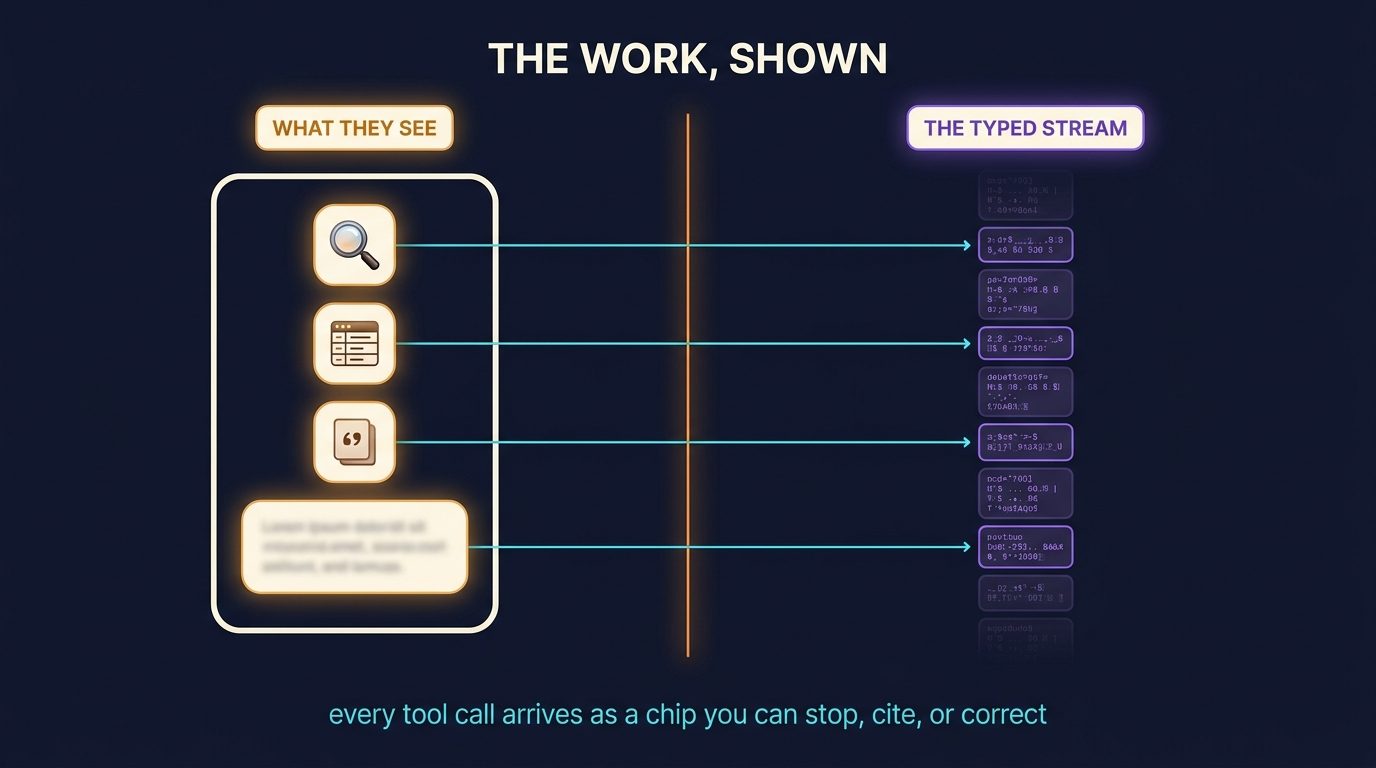
AG-UI is the convention of streaming tool calls and observations into the user interface in real time as the agent runs. The user sees: "Searching the contracts index for 'indemnification cap'..." then a result chip, then "Reading section 4.2 of MSA-2024-014..." then a result chip, then a final synthesis. Instead of waiting on an opaque spinner, the user watches the agent work.
Streaming tool calls is an architecture choice, even though it sounds like a UI one. The runtime has to emit tool-start and tool-end events before and after each tool call, with the structured payload of each. The frontend has to consume those events as a stream (server-sent events, WebSockets, or whatever the framework supports) and render each event into a typed UI component (a search chip, a code block, a citation card, an image preview). The data shape of the event has to be stable enough that new tools can be added without rewriting the renderer; the standard is to emit a tool name plus a generic payload plus a content-type hint, and let the renderer dispatch to the right component based on the hint.
Three things fall out of that architecture. The first is trust: the user who watches the agent work and sees it cite sources is dramatically less likely to suspect a hallucination than the user who sees only the final answer. The second is interruptibility: the user can hit "stop" between tool calls and the agent halts at a clean checkpoint. The third is teachability: when the agent gets something wrong, the user can point at the specific tool call that produced the bad observation, and the operator can fix the prompt or the tool that failed without reverse-engineering the whole session.
Orchestration: workflows over single-agent loops
A single agent in a loop handles short tasks well. Anything longer than three or four tool calls benefits from being broken into a workflow of smaller agents, each scoped to one job. LangGraph is the orchestration layer I use for this on the Python side. The workflow is a directed graph: each node is an agent or a deterministic step, and edges route based on state. The state is a typed Pydantic model that travels through the graph and accumulates the results of each node.
The first reason to break a long task into a workflow is bounded blast radius. A single 30-step agent loop that goes wrong at step 22 is hard to debug because the model's reasoning at step 22 depends on its memory of steps 1 through 21. A workflow of three smaller agents, each running a clean four- or five-step loop with a typed handoff between them, is easy to debug because each agent's input and output are fully typed and the boundary between agents is a state transition you can inspect.
The other reason is parallelism. Independent branches of the workflow run in parallel. If the workflow has a "research three competitors" step, the research on each competitor runs as a parallel agent invocation, with the results merged at the next node. The single-loop pattern serializes everything; the workflow pattern parallelizes everything that doesn't have a hard sequential dependency. On a real workflow with non-trivial work per step, that parallelism is the difference between a thirty-second response and a five-minute one.
How you know the agent is working
Agents are evaluated end-to-end and per-step. End-to-end evals run a fixed set of held-out tasks and check whether the agent produced the right final result. Per-step evals run on individual tool calls and check whether the agent chose the right tool and the right arguments given the state at that step. End-to-end is the metric the operator reports. Per-step is the metric the engineer debugs against.
An agent eval harness has the same shape as a RAG one: a CSV of inputs, a fixture per row that defines the expected behavior, a runner that executes the agent and checks the output, and a LogFire span per run that captures every tool call, every observation, and the final outcome. The CSV starts at thirty rows and grows, the harness runs on every deploy, and a dashboard shows the pass rate over time. When the pass rate drops, the engineer pulls the failing rows, opens the LogFire span, and sees exactly which tool call went wrong. That harness is the unglamorous infrastructure that separates an agent that ships from an agent that demos.
When an agent is the wrong tool
Agents are the right answer when the task has variable structure (the steps depend on the input), when the toolbox is large (more than three or four operations to choose from), and when the user benefits from transparency. Agents are the wrong answer when any of those is missing. A task with fixed structure is a pipeline; build it as a deterministic pipeline and let the model do bounded synthesis at one or two specific nodes. A task with three tools is a chained prompt; build it as three sequential model calls with explicit routing. A task where the user doesn't benefit from transparency (a single-shot question with no follow-up) is a single inference; don't build a loop you don't need.
The pattern I see most often in client work is "we need an agent" when the actual problem is "we need a workflow with one structured-output node and one retrieval-augmented node." The fix is correctly identifying that the task has fixed structure and building a deterministic pipeline that calls the model where reasoning is required and skips it where it isn't. Pipelines are cheaper, faster, and easier to debug than agents. Use an agent when it earns its keep.
What this gets you
An agent built this way is an operator's tool, not a magic trick. The user sees what it's doing. The operator can debug what it did. The engineer can change the tool set or the prompt without rebuilding the system. The CFO can see the token cost per session and decide whether the value-per-session justifies it. None of this is exotic, and all of it is what separates a system from a demo.
If you're evaluating an agent vendor or an internal team, ask about the loop shape, the tool contracts, the AG-UI event stream, the checkpoint persistence and the eval harness. If they can't show you a session replay with every tool call visible, what they've built is opaque, and opaque doesn't ship.